
Theme Preview Ep. 3: AUDI RS3 — a digital cluster on your phone
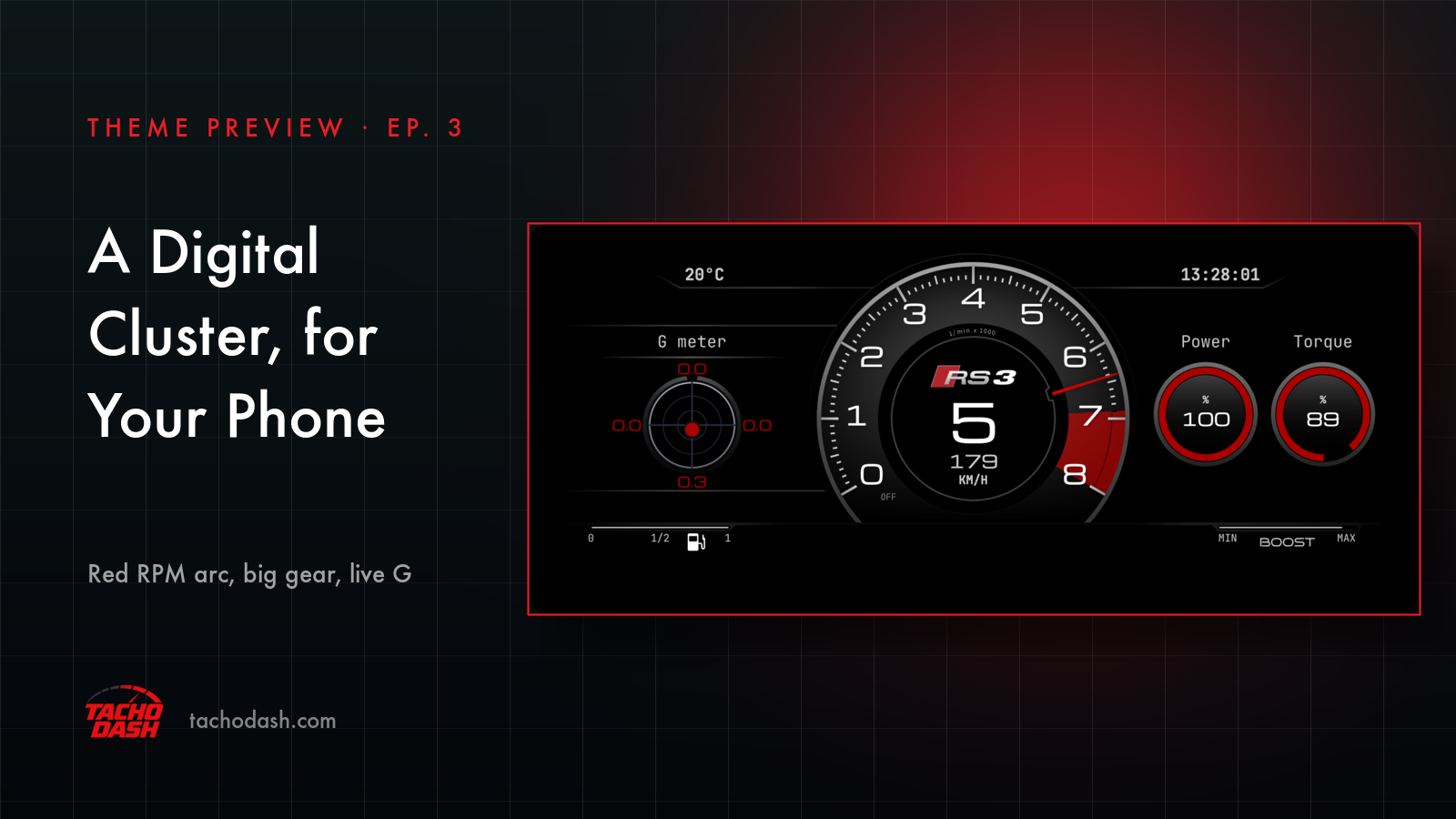
This is the third one in the Theme Preview series. AUDI RS3 redraws the digital instrument cluster of an Audi RS3 for TachoDash's own renderer. It is a redraw, not a copy: every element is drawn by TachoDash. Your phone joins the game over Wi-Fi and the screen fills with revs, speed, gear, power, torque and G.
What it looks like
Black, with red on it. The type is Michroma: wide, squared-off letters with a flat, technical feel.
The arc. A red pointer sweeping clockwise around the middle of the screen, from lower left to lower right. The numbers around it are thousands of rpm: 0 to 8 on this car means 0 to 8000. The small line under the top of the arc says 1/min × 1000, so nobody has to guess. Ticks come in three sizes — every hundred, every five hundred, every thousand.
The red zone. It is not painted on. It starts where the game tells you to shift and runs to the end of the arc, so it moves from car to car. Inside it the thin ticks turn black, so they stay readable on red.
Gear and speed. Dead center. The gear is the biggest thing on the screen. Under it the speed, and under that the unit — KM/H or MPH, whichever your app is set to.
Power and torque. Two rings on the right. Each one is a percentage of that car's own peak, not an absolute number, so it works in any car. The theme learns the peak while you drive; change cars and it starts learning again. In the picture, 100 and 89 mean full power and 89% of the torque.
G meter. On the left. A dot that slides around a ring, four numbers around it — up, down, left, right. All four read positive; their position tells you which way the car is pulling.
Fuel and boost. Bottom left, a bar from 0 to 1 with a half mark and a fuel icon. Bottom right, MIN — BOOST — MAX and a thin bar that fills as boost builds.
Top line. Ambient temperature on the left, in °C or °F depending on your units. The clock on the right, down to the second.
That is the whole screen. No lap times, no tire temperatures, no map.
How to switch
- Turn on data output in the game. Horizon setup, or Motorsport setup.
- Update TachoDash to 1.5.4 or later. An older build says so instead of downloading the theme.
- Open the Themes tab, search
AUDI RS3, open it and download. - Tap Apply. The dashboard switches right away and your connection settings stay where they were.
- One thing to know: the design is fixed. No color options, no layout options. What you see is what you get. If you want to change units, read what is adjustable first.
Which games
Every Forza the app supports, all four: FH5 · FH6 · FM7 · FM2023.
Links
- TachoDash on the App Store
- TachoDash on Google Play
- The theme page
- Running it on a spare phone? Come hang out — discord.gg/8NuNrawqvw
TachoDash is an unofficial fan project.
Get TachoDash:

